

·
🚀 A three-column desktop layout — your everyday links, out of the menu | 8.26
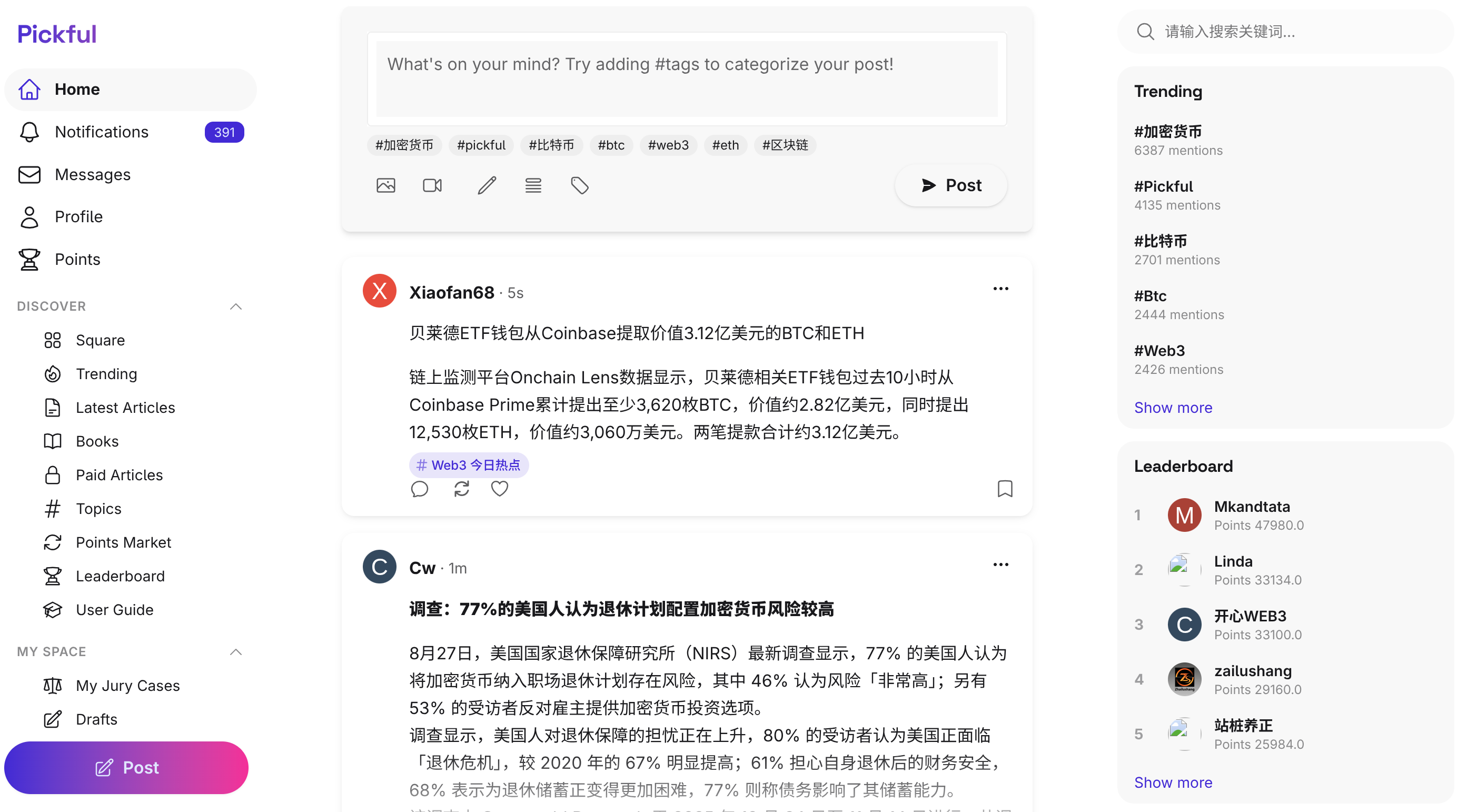
A left nav and right rail land on desktop, classic is one click away — plus a look at what's next.
Hey Pickful community,
Based on your feedback, here’s what’s new today. This one is about desktop navigation — something you’ve used for a long time, and that hasn’t had enough room for a while.
🖥️ Why change it
Desktop had one fixed top bar. A top bar only has so much horizontal space, so a handful of links lived there and everything else went into the hamburger menu in the corner.
That created two problems:
- The things you use most were buried deepest. Compose, notifications, your profile, the topic square — all daily, none of them with a permanent home. Every trip started by opening a menu
- Both sides of the screen sat empty. Monitors keep getting wider; the page only ever used the middle
Our answer: move navigation from the top to the side, and actually use the width you have.
📐 What the new layout looks like
Desktop is now three columns:
Column |
What’s in it |
|---|---|
Left |
Home, compose, notifications, messages, profile, points, plus collapsible Discover / My Space / Earnings groups |
Middle |
Your timeline, unchanged |
Right |
Search, trending tags, points leaderboard |
Every link from the old dropdown is in the left rail. Four more joined them — compose, notifications, profile, and the topic square — which never had a permanent spot before.
Both rails stay pinned while the timeline scrolls. When the window is short, each rail scrolls inside itself instead of squeezing the content.
🔄 Prefer the old one? One click back
The new layout isn’t forced on anyone. Bottom left, ⋯ → Switch to classic puts the familiar top bar right back. To return, the classic menu has Switch to new layout.
Switching is instant — no reload, no server round-trip. Your choice is remembered in your browser, so it sticks next time.
Also, the new layout only appears on desktop (1024px and up). Mobile browsers, the app, and chat pages all keep the classic top bar. Nothing changed there.
✨ While we were in there
- Icons are consistent across the site now. Outline and solid styles used to be mixed; they follow meaning now, and small icons use glyphs drawn for their size, so edges come out crisp instead of soft
- Fixed the menu button’s alignment
- Fixed the sidebar’s compose link on short-URL pages
🌱 On this summer, and what comes next
If you’ve been here a while, you’ve probably noticed how much Pickful already does:
- Short posts, long-form articles, serialized books, and paid content
- Topics, bounties, and moderation decided by a community jury
- A points system, and a market where points actually trade
- Custom domains, so your work lives under your own brand
- An API and MCP tools, so AI agents can publish here directly
Past a certain density, another feature stops being value and starts being weight. So this summer we deliberately held back on building more, and spent the time on two things instead: making what already exists feel solid (today’s navigation work is part of that), and getting clear on what is actually worth building next.
Over these months we’ve been researching and talking with a lot of people in the community. One direction kept coming up, and kept getting the same reaction — that’s interesting. We’ve been working on it quietly for a while, and the first version is close.
It won’t arrive finished. We’d rather ship something small and real, then iterate on it together with the community — the way Pickful has been built all along.
More soon.
💬 A note to the community
Good navigation is invisible. You only think about it when it gets in your way. The goal here was simple: the few places you go every day should be visible without a click.
If something feels off, or a link isn’t where you expect it, tell us. The way back to the classic layout is always there — you’re never locked into the new one.
These updates are live on Web, iOS, and Android with no app update needed (the three-column layout is a desktop web feature).
Pickful Team
8.26
转发此帖子?
与您的关注者分享。
回复