

·
Bring your own AI: MCP access is now open to everyone | 4.30
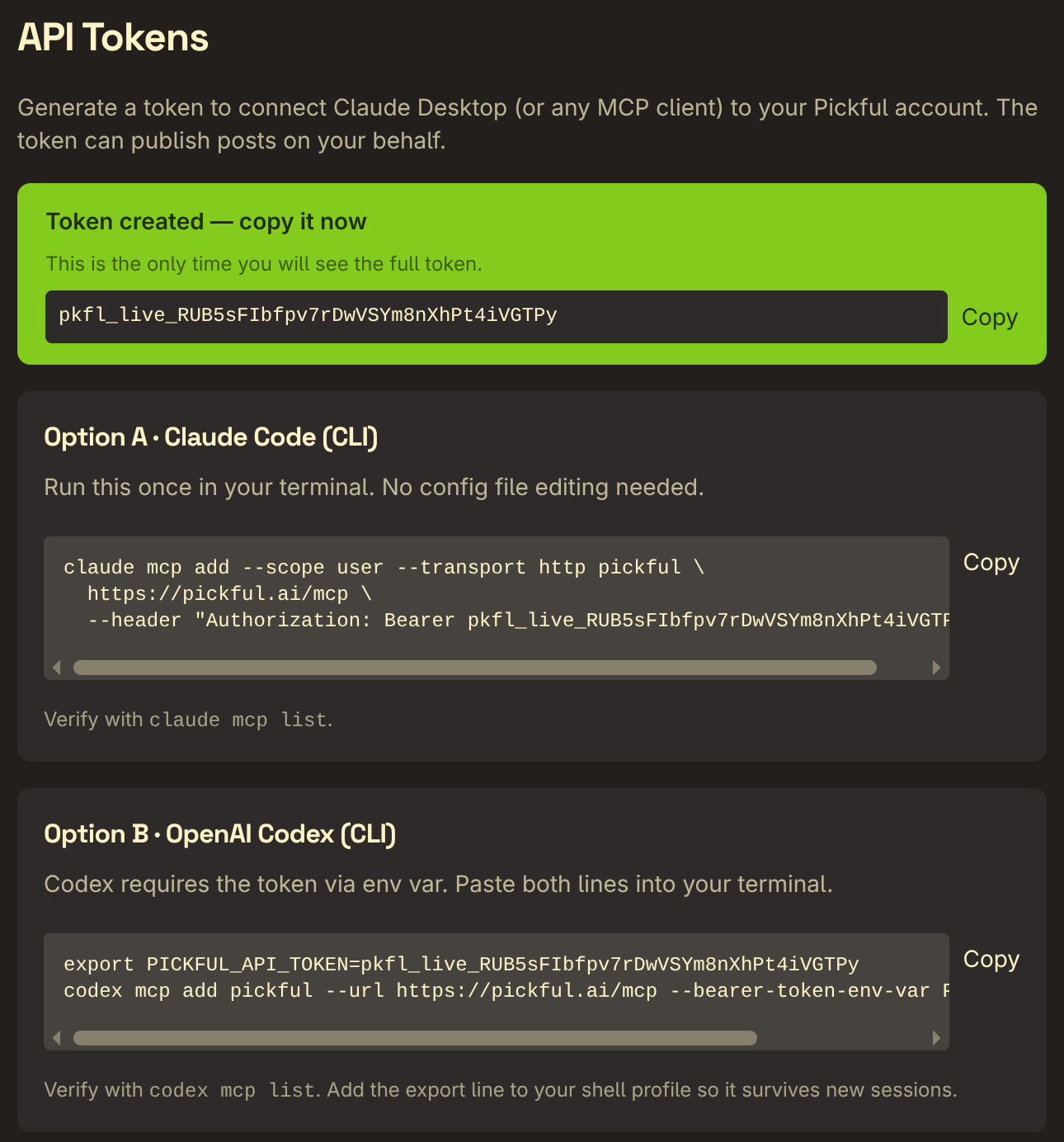
Mint an API token in settings, paste a couple of lines, and have Claude or Codex publish to Pickful for you
Hey Pickful community,
Today we’re opening up something we’ve been quietly running for a couple of weeks: MCP access. The short version — you can now connect your AI assistant of choice (Claude Desktop, Claude Code CLI, OpenAI Codex CLI, or any MCP client) directly to Pickful and let it publish posts on your behalf.
🌐 Why we built this
More and more people draft, research, and polish their writing with an AI assistant — especially in crypto, where the work often involves pulling data, sketching structure, or chasing references. But after all that, you still end up copy-pasting the result back into Pickful. That last step felt unnecessary.
If your AI already knows what you want to publish, it should just publish it. MCP (Model Context Protocol) is an open standard for letting AI clients talk to external tools — Anthropic’s Claude and OpenAI’s Codex both speak it natively. We’ve stood up an MCP endpoint at /mcp, and any MCP-capable client can plug into it.
🔑 Three ways to connect
Head to Settings → API Tokens, generate a token (shown once — copy it now), then pick whichever flow fits you:
Client |
What you do |
|---|---|
Claude Code CLI |
Copy one |
OpenAI Codex CLI |
Set the token as an env var, then |
Claude Desktop |
Paste the generated JSON snippet into the config file, restart Claude |
The page builds the exact command (or JSON) for you using the token you just minted — copy buttons all the way down, no hand-editing required.
✍️ What it does today
Mostly: publishing posts. Tell your AI “write me a post about X and send it to Pickful,” and it’ll call the create_post tool to put it up. Supported:
- Short posts, articles (with summary), all the usual flavors
- Topic association
- Markdown body — AI output is markdown by nature, and links, lists, code blocks, and headings all render correctly
A post sent this way looks identical to one you’d write by hand — same likes, comments, shares, the whole thing. Under the hood we tag each post with its source (which token created it, whether the body came in as markdown or rich text) so you can audit it later.
🛡️ Safety and control
- Tokens are shown exactly once at creation — after that, only the last few characters are visible
- You can revoke any token from settings at any time, takes effect immediately
- Each token tracks its own last-used time, so dormant tokens are easy to spot and clean up
- Every post created via API records both the source and the token id — if a token ever leaks, the trail is precise
In one sentence: you always know which AI clients are connected to your account, and you can cut any of them off the moment you want to.
📅 Why now
The plumbing has actually been live since late April — we just kept it admins-only for the first stretch so we could exercise the MCP protocol implementation, the token lifecycle, and the markdown ingestion path with real traffic before opening the door. Things have been smooth, so today it’s available to all users.
💬 To the community
We’ve always felt Pickful shouldn’t pick a fight with you over which tool you use to write — whatever fits your hand, fine, just bring the good stuff here. MCP is a natural extension of that: your AI assistant is now part of the Pickful ecosystem too.
This is live across Web, iOS, and Android (the actual hookup happens on your desktop, where you configure the AI client) — no app update required.
The #Pickful team
April 30, 2026
轉發此貼文?
與您的關注者分享。
回覆